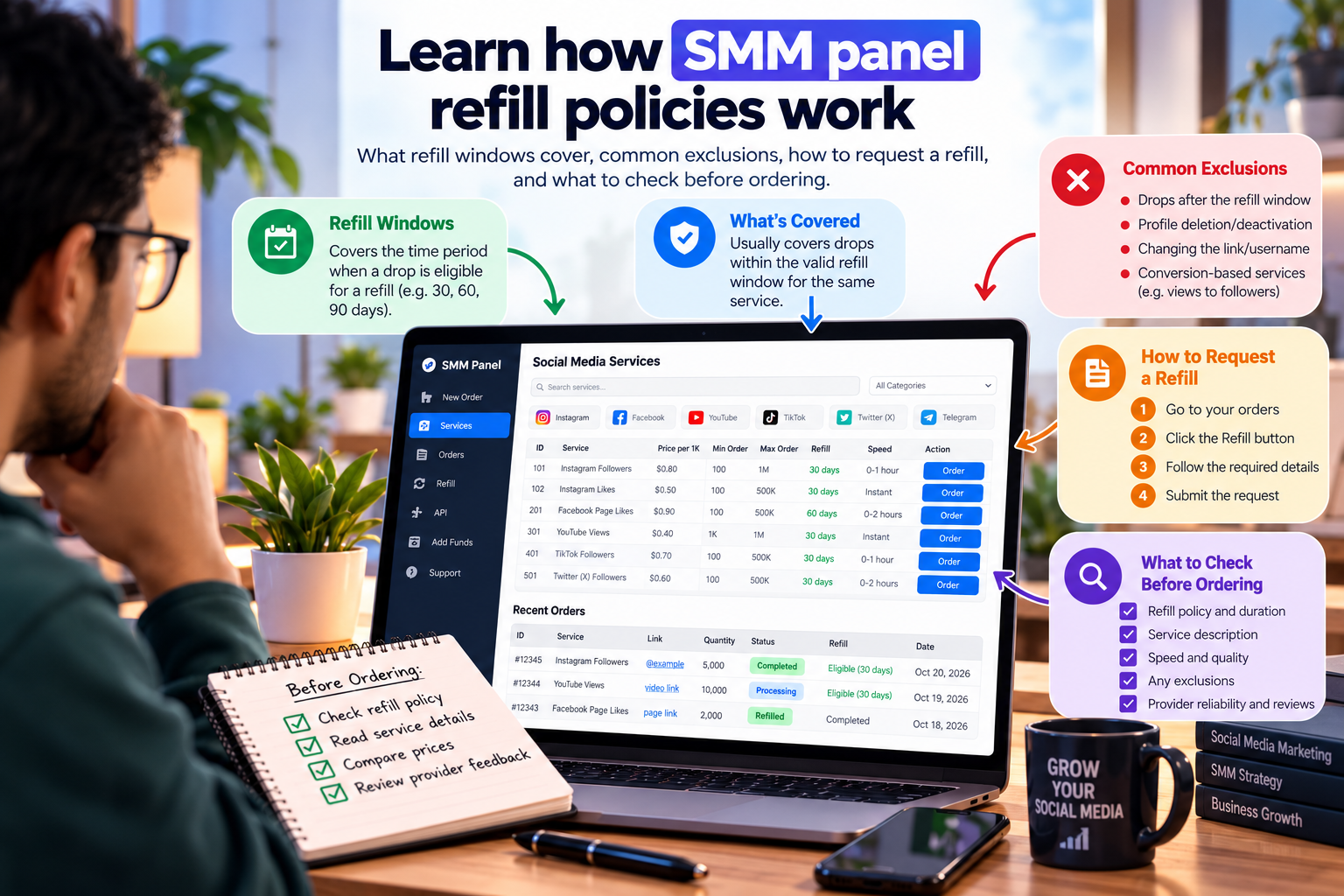
SMM Panel Refill Policy: What Buyers Should Check Before Ordering
When ordering social media services through an SMM panel, the listed price is only one part of the decision. Buyers should also understand what happens if followers, likes, views, or other delivered metrics drop after an order is completed.
This is where an SMM panel refill policy becomes important. A refill may allow eligible drops to be replenished without an additional service charge, but the coverage depends on the specific service and its terms. Not every order includes a refill, and a refill does not mean that a count is guaranteed to remain unchanged forever.
Before placing an order, buyers should check the refill period, eligibility requirements, request process, and exclusions. Understanding these details can help prevent misunderstandings and make it easier to compare services fairly.
What Is an SMM Panel Refill Policy?
An SMM panel refill policy explains whether and under what conditions a provider will replenish eligible quantities that drop after delivery.
For example, a buyer orders 1,000 followers through a service that explicitly includes a 30-day refill period. If the delivered count later decreases during that period, the buyer may be able to request a refill, provided the order meets the service's conditions.
The exact process varies by provider. Some services may offer a refill button or automated process, while others may require a support request. The service description should explain which method applies.
A refill generally means that eligible units are replenished. It is not the same as receiving money back, and it does not guarantee that an account will retain every unit indefinitely.
Check Whether the Specific Service Includes a Refill
One of the most important steps is to check the individual service listing rather than relying on a general statement on a website.
An SMM panel may offer refill coverage for certain services but not others. Even two services for the same platform may have different terms, depending on their delivery method and provider conditions.
Before ordering, look for:
Refill availability: Does the selected service explicitly include refill coverage?
Refill period: How long after delivery can an eligible request be made?
Eligible quantity: Which drops or order conditions qualify?
Request method: Is the refill automatic, available through the dashboard, or handled through support?
Service restrictions: Are there conditions involving the target URL, account visibility, or overlapping orders?
If any important term is missing, ask support about the exact service before paying. Keep a copy of the service description and its conditions at the time of purchase.
Understand the Refill Period
The refill period, sometimes called the refill window, is the timeframe in which an eligible drop may be covered.
A service might state a 30-day refill period, while another service may offer a different period or no refill at all. The number of days alone does not tell the whole story: buyers also need to know when the period begins and what happens when a request is submitted near its end.
For example, if a service offers a 30-day refill window, check whether the window starts when the order is placed, begins delivery, or is marked complete. Do not assume that every provider calculates the period in the same way.
A longer refill window is not automatically better if the terms are unclear or the request conditions are difficult to meet. Compare the complete policy, not just the number of days displayed beside the service name.
Know What Can Make a Refill Request Ineligible
Refill coverage usually comes with conditions. A request may be rejected if the order falls outside the stated policy or the provider cannot verify the original delivery.
Common exclusions can include:
Expired refill period: The request is submitted after the eligible window has closed.
Changed account details: The username, profile, or target URL has changed in a way that prevents the service from identifying the original order.
Private or inaccessible content: The target account or post is no longer accessible when the service requires public access.
Deleted content: The profile or post associated with the order has been removed.
Overlapping services: Multiple orders on the same target make it difficult to determine which delivery or drop is being assessed.
Service without refill coverage: The original listing did not include a refill benefit.
These are common examples, not a universal set of rules. The actual exclusions depend on the service's published terms. Read those terms before ordering, particularly if the campaign will run for several weeks.
Refill vs. Refund: Understand the Difference
Refill and refund policies address different situations, so buyers should not treat them as interchangeable.
What a refill does
A refill is intended to replenish eligible units that drop after delivery. If the request meets the service conditions, the provider may deliver replacement units without charging an additional service fee.
What a refund does
A refund concerns returning money or credit under the provider's refund policy. Depending on the circumstances and terms, it may apply to eligible issues such as an undelivered order or a payment error.
A drop in a completed order does not automatically mean that the buyer qualifies for a monetary refund. Similarly, a refill policy does not necessarily cover an order that was never delivered.
Before paying, read the refill and refund terms separately. If a problem occurs, identify whether it concerns missing delivery, a post-delivery drop, or a payment issue so that you can follow the appropriate process.
How to Request a Refill Without Unnecessary Delays
If a service includes refill coverage and the delivered count drops, follow the provider's stated process as soon as you notice the issue.
Find the original order. Open your order history and locate the order ID.
Review the current count. Check whether the count has dropped and whether the issue appears to fall within the service's refill conditions.
Check the deadline. Confirm that the refill window is still open.
Submit the request correctly. Use the dashboard's refill option or the support method specified by the provider.
Keep the order details. Save the order ID, request reference, and relevant service terms so you can follow up if needed.
Monitor the status. Wait for the request to be processed and check for any status updates before submitting a duplicate request.
A refill request is not the same as a new order. Submitting multiple requests for the same issue without checking the original status may complicate the process.
If a request is rejected, review the stated reason and compare it with the service terms that applied when you ordered. Contact support if you need clarification.
What SMMZY Buyers Should Know About Refill Coverage
SMMZY offers refill coverage only when the individual service listing explicitly states that the service includes it. Buyers should not assume that every SMMZY service comes with a refill guarantee.
Before placing an order, review the selected service's current description and check its refill conditions. Where a 30-Day Refill Guarantee is listed, it applies subject to the service's stated eligibility requirements and exclusions.
Refill coverage does not apply to every type of drop. For example, drops caused by account changes, privacy-setting updates, or simultaneous services may fall outside the applicable conditions.
Buyers should also remember that any SMMZY service can drop. A refill option may provide a remedy for eligible drops, but it does not promise permanent retention or guarantee organic reach, engagement, sales, or other business results.
If you have a question about a specific order, keep the order ID and contact support through the available channels. WhatsApp and Telegram responses may be delayed, so creating a ticket through the SMMZY website is the recommended route for faster assistance.
A Refill Policy Checklist Before Ordering
Use this checklist before purchasing a service, especially if the order involves a larger quantity or a longer campaign.
- Confirm that the selected service explicitly includes refill coverage.
- Check the refill period and when it begins.
- Read the eligibility conditions and exclusions.
- Understand how to submit a refill request.
- Confirm whether the request must be made before a specific deadline.
- Keep the original order ID and a copy of the service details.
- Check whether account, username, or privacy changes could affect eligibility.
- Avoid running overlapping services on the same target without understanding the provider's rules.
- Read the refund policy separately from the refill policy.
- Make sure the service fits your needs before committing your budget.
For buyers comparing several options, reviewing refill terms alongside order limits and service pricing can make the decision more informed. The cheapest service is not necessarily the most suitable if its conditions do not match the campaign requirements.
Frequently Asked Questions
What does refill mean in an SMM panel?
A refill is a service benefit that allows eligible quantities lost after delivery to be replenished under the provider's stated conditions. It does not mean that every drop will automatically be replaced or that the delivered count will remain permanent.
Do all SMM panel services include a refill?
No. Refill availability varies by service. Always check the specific listing rather than assuming that a general statement about refills applies to the entire catalogue.
How long does an SMM panel refill last?
The refill period depends on the service. Some listings may offer a defined period, such as 30 days, while others may use different terms or provide no refill coverage. Check the listing to confirm the exact window and how it is calculated.
Does a refill guarantee prevent drops?
No. A refill policy provides a potential remedy for eligible drops within its stated conditions. It does not prevent drops from occurring or guarantee permanent retention.
Can I request a refund instead of a refill?
That depends on the circumstances and the provider's refund policy. A refill usually replenishes eligible quantities, while a refund concerns returning money or account credit. Review both policies to understand which remedy may apply.
Why might a refill request be rejected?
Possible reasons include an expired refill window, a service that does not include refill coverage, changes to the target account or URL, inaccessible content, or other conditions specified in the service terms.
Does SMMZY provide refill coverage for every service?
No. SMMZY's 30-Day Refill Guarantee applies only to services whose individual listings explicitly include it. Buyers should review the selected service's terms and exclusions before ordering.
Check the Refill Terms Before You Order
A clear refill policy helps buyers understand what happens if an eligible quantity drops after delivery. The key is to look beyond the word "refill" and check the period, request process, eligibility requirements, and exclusions.
Before ordering through SMMZY, review the individual service listing, confirm whether refill coverage is included, and make sure the conditions fit your requirements. Taking a few moments to check these details can help you make a more informed purchasing decision and avoid misunderstandings later.